
How to use DispatchWala: step-by-step guide
DispatchWala finds brand-new, active MC carriers every day and helps you call, follow up and sign them. This guide walks through every page of the app, with pictures, in about 10 minutes.
Roman Urdu mein parhein: DispatchWala guide (Urdu)
1. Create your free account
Open dispatchwala.com, choose Create free account, and type your name, WhatsApp number, email and a password. No card is needed. Your leads and notes are saved to your account, so they show on your phone and computer.
2. Find new carriers
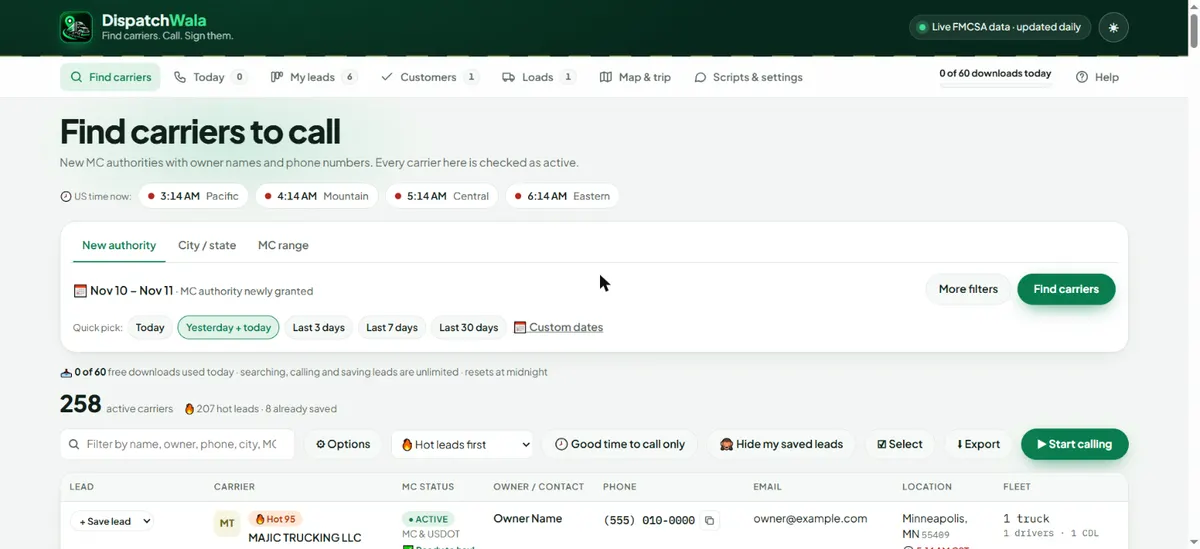
On Find carriers, the New authority tab is already set to Yesterday + today: the freshest leads. Press Find carriers. Use City / state to search one state, city or ZIP, or MC range to search a block of MC numbers. More filters lets you pick equipment (dry van, reefer, flatbed, box truck, power only…), cargo, CDL or non-CDL, number of trucks, and "has a phone number".
3. Read the results
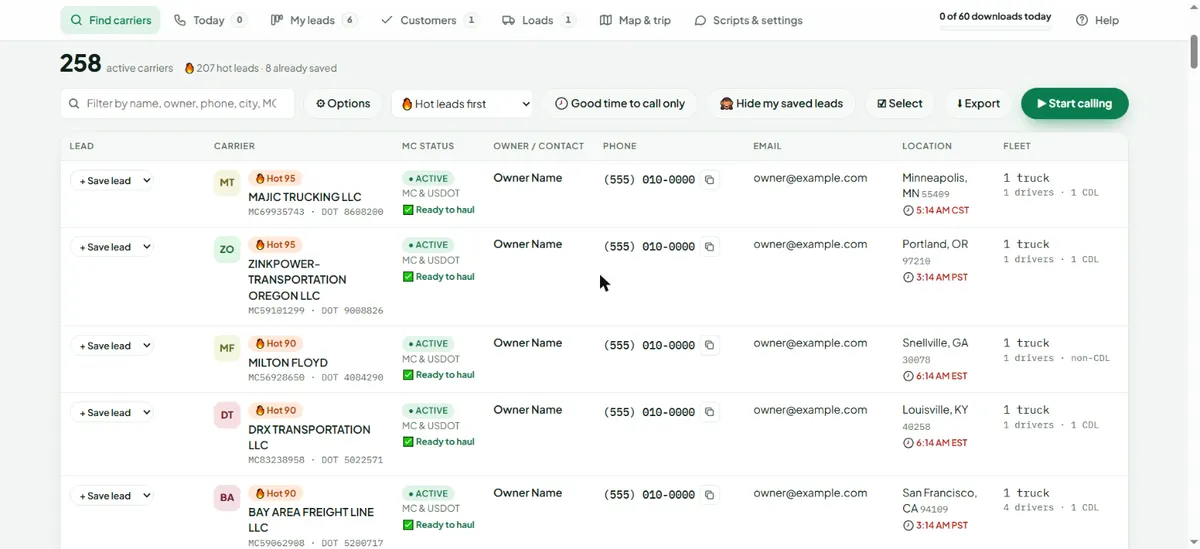
Every carrier in the list has active MC authority and an active USDOT number. Each row shows a lead score (🔥 Hot first), the owner's name, phone, email, city with the carrier's local time, and fleet size. The 📋 button next to a phone copies it; once you copy or call a number, that row turns blue so you know you already reached out. Use Good time to call only to hide carriers where it's too early or too late.
4. Call with Calling mode
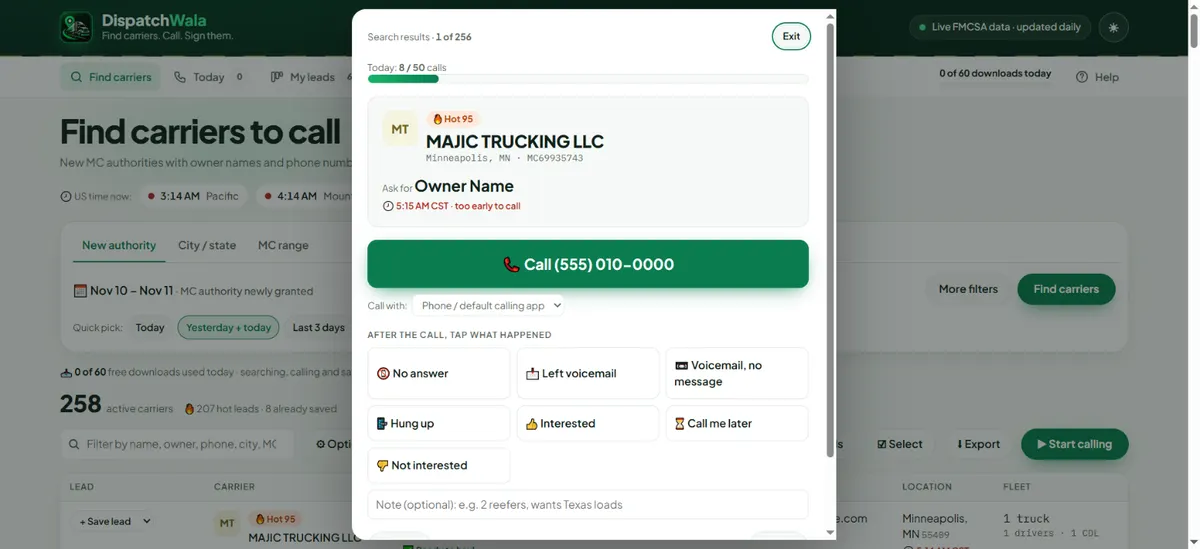
Press ▶ Start calling. You get one carrier at a time with a big Call button and who to ask for. After the call, tap what happened: No answer, Left voicemail, Voicemail no message, Hung up, Interested, Call me later or Not interested. The app saves the lead, sets the next follow-up in the carrier's time zone and moves to the next carrier. Call me later lets you pick the exact date and time, and you get an alert at that time. Choose your calling app (phone, Google Voice, Teams, Skype, Zoom Phone) under Call with.
5. Start every day on Today
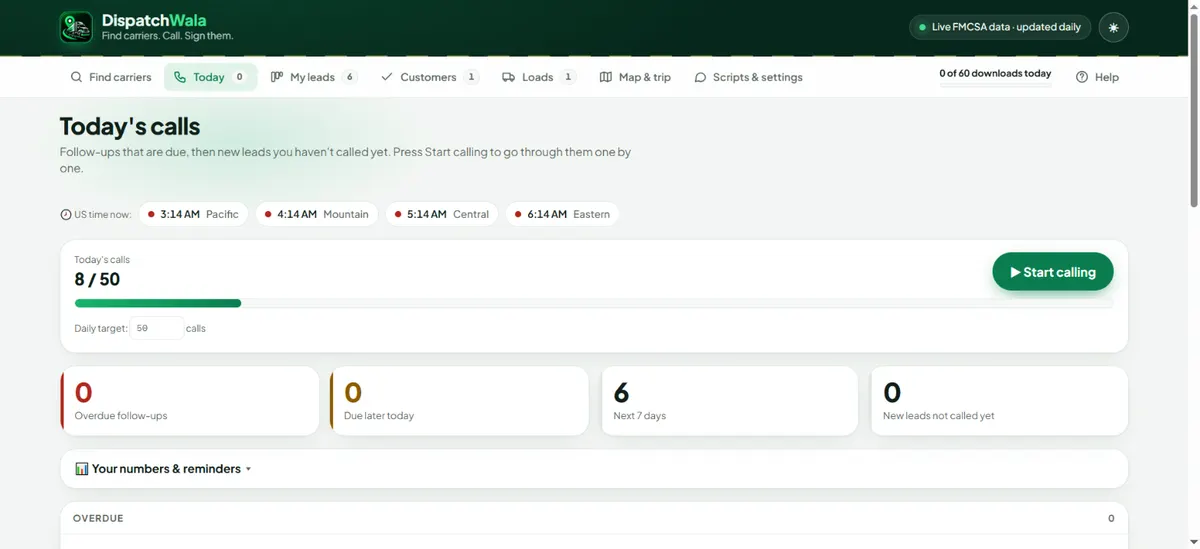
Today shows your calls so far against your daily target, overdue follow-ups, follow-ups due later today and new leads you haven't called. Press ▶ Start calling here to go through today's follow-ups one by one. Turn on follow-up reminders to get a notification when a call is due.
6. Track every lead in My leads
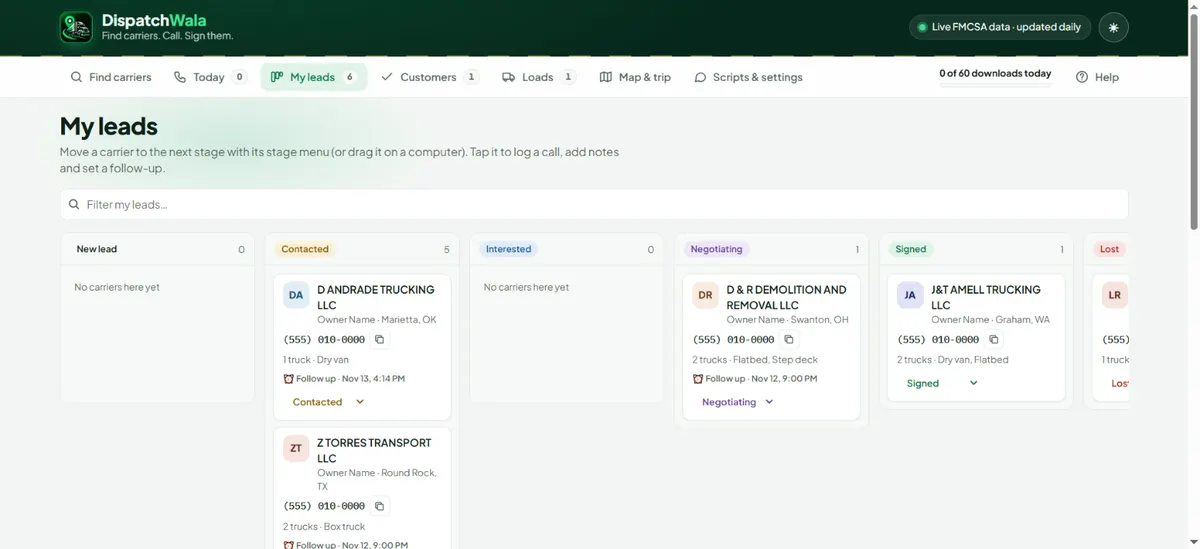
My leads is your pipeline: New lead → Contacted → Interested → Negotiating → Signed (or Lost). Change a card's stage from its menu, or drag it on a computer. Tap a card to see notes, call history, company details and send a script, text or email.
7. Sign the carrier
Move a carrier to Signed and it appears under Customers. Add the truck type, your fee %, start date, lanes and driver, and tick the onboarding checklist (agreement, MC letter, W-9, insurance, factoring or bank details, truck details, broker packets). DispatchWala re-checks signed carriers about twice a day and warns you if their authority or insurance changes.
8. Check every broker before you book
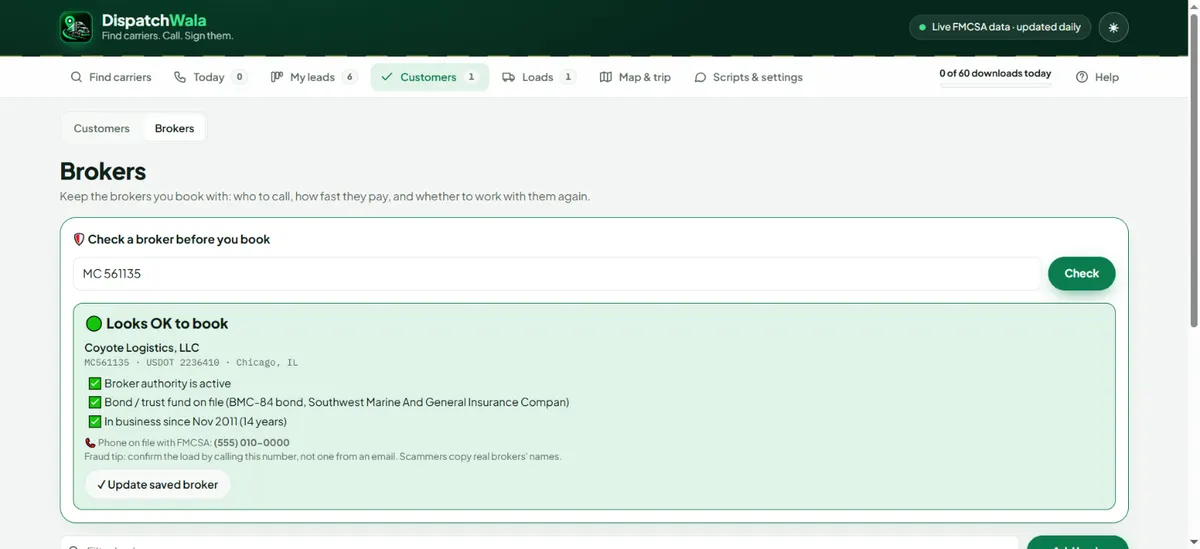
Under Customers → Brokers, type a broker's MC number and press Check. You see whether broker authority is active, whether the $75,000 bond or trust fund is on file, how long they've been in business and the phone number FMCSA has on file. Save the broker with how fast they pay. The same check is free on the public broker check page.
9. Log loads and send invoices
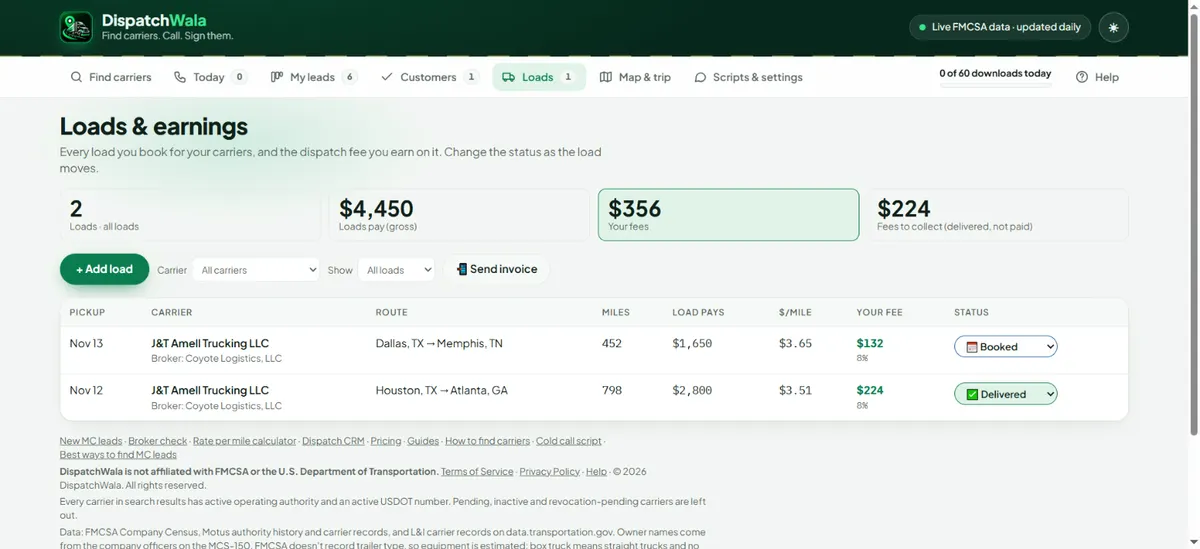
On Loads, add each load: carrier, pickup and delivery, what it pays and your fee %. Miles are filled in automatically. Change the status as the load moves (Booked → On the road → Delivered → Fee paid). The top shows your fees and what is still owed. Pick a carrier and press Send invoice to send the week's delivered loads on WhatsApp.
10. Plan trips on Map & trip
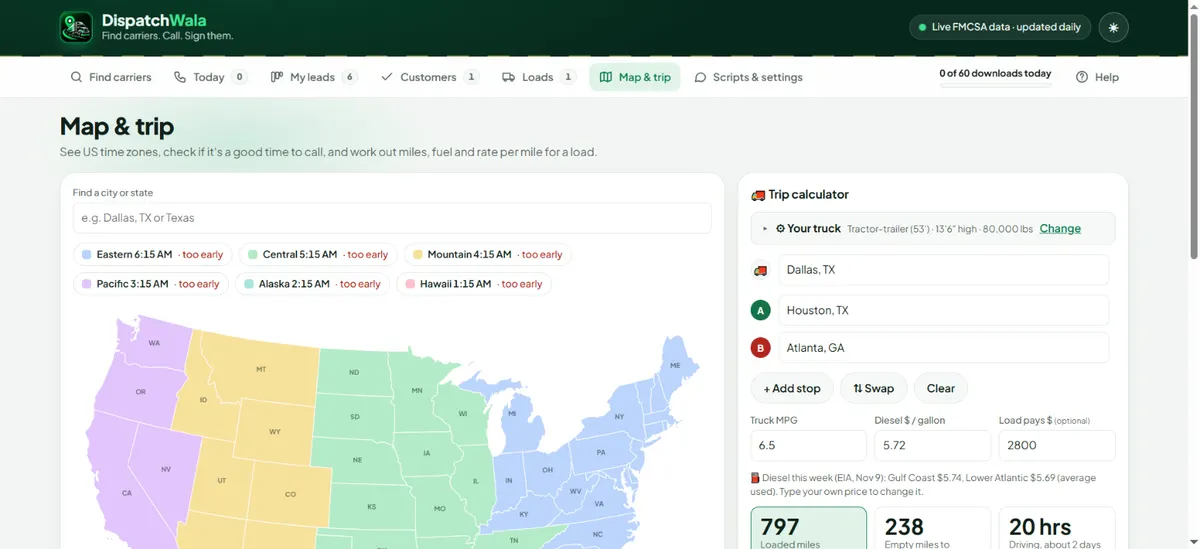
Map & trip shows every US time zone and whether it's a good time to call. The trip calculator takes the truck's location, pickup, delivery and extra stops, and gives truck route miles, empty miles, fuel cost with this week's diesel price, rate per mile, toll miles, an ETA with HOS breaks and weather warnings. Set your truck's size, weight and hazmat under Your truck. Share the trip on WhatsApp in one tap.
11. Set up your details and team
Under Scripts & settings, add your name, company, phone, email and fee %. They fill in the call script, text, emails and invoices, which you can edit. Choose how you make calls, and use Download backup any time. Working in a team? Open My account and type your team lead's code under Team; your lead then sees your calls and leads.
Questions
Is DispatchWala free?
Yes. Searching, calling, saved leads and every page of the app are free and unlimited. Only downloads are limited: 60 carriers a day on the free plan, 300 on Pro.
Does it work on a phone?
Yes. It runs in the browser on any phone or computer, and your leads sync between them.
The Call button does nothing on my computer.
Choose your calling app under "Call with" (Google Voice, Teams, Skype, Zoom Phone or Just copy the number). Every Call click also copies the number.
Find new carriers to call, free
DispatchWala shows brand-new, active MC carriers every day with the owner's name and phone number, then helps you call, follow up and sign them. Free account, no card.
Create a free account